
I’ve always believed that the look and feel of your desktop environment affects your productivity. And trust me, nothing kills motivation faster than staring at a 1998-looking interface while trying to work in 2025.
I have a 4th-generation computer with 4 GB of RAM — pretty modest by today’s standards. I’ve tested many lightweight Linux distro on it — from Bodhi Linux to Puppy Linux and AntiX.
Yes, they work exceptionally well because they’re truly lightweight, but let’s be honest — some of them look like they were made for our forefathers. Functional, yes. Beautiful? Absolutely not!

So I started hunting for Linux distros that are lightweight but visually appealing; the ones that run smoothly on old machines yet make you feel like you’re using something from the future. Here are my personal picks.
1. Peppermint OS
Website: https://peppermintos.com

If you want simplicity, speed, and elegance all in one, Peppermint OS is your guy. It’s built for performance on old hardware while offering a clean, modern UI that doesn’t feel stripped down.
It combines elements of LXDE and XFCE desktops, creating a crisp interface that feels light but modern. What really stands out is how it integrates web apps directly into your system — you can turn your favorite websites into desktop apps in seconds.
The theme and icon set are minimal yet sharp. The panel layout feels intuitive, and the desktop background options give it a professional polish right out of the box. Even on 2 GB RAM, Peppermint flies. It boots fast, stays stable, and doesn’t overheat old processors.
2. MX Linux
Website: https://mxlinux.org

MX Linux is one of those distros that feels balanced between beauty and performance. It’s based on Debian but uses XFCE, giving it a lightweight yet powerful structure.
The MX team did something impressive: they polished XFCE to the point where it looks like a full-fledged modern desktop. It comes with nice shadows, modern icons, and sleek menu designs.
The color scheme, window borders, and icon consistency make it look more expensive than it is. It’s like having a mid-range car that looks like a Tesla. MX Linux has one of the best system resource balances out there — idle RAM usage is incredibly low, yet multitasking feels smooth. It’s also very customizable if you want to tweak the visuals even further.
At the time of writing this post, MX Linux is what I currently use on my 4th gen desktop computer.
3. Linux Lite
Website: https://www.linuxliteos.com

Linux Lite is one of the most user-friendly lightweight distributions you can get. It’s designed for people migrating from Windows, and you can feel that care in the design.
Out of the box, it comes with a clean XFCE interface, attractive icons, and a subtle color palette. Everything looks balanced — not flashy, but far from ugly.
The developers focused on simplicity and usability. Menus are clear, fonts are crisp, and panels are positioned perfectly for beginners. You can easily tweak it to look even more modern with community themes.
It’s optimized for older PCs, and even with a handful of apps open, it stays responsive. If you’re looking for something that’s easy to use and still pleasing to the eyes, Linux Lite is gold.
4. Lubuntu
Website: https://lubuntu.me

Gone are the days when Lubuntu looked plain and dull. The modern versions now use the LXQt desktop instead of the old LXDE — and that’s a massive upgrade visually.
LXQt feels sleek, clean, and futuristic, yet it’s still incredibly light on resources. On older machines, Lubuntu feels like a breath of fresh air — fast, stable, and stylish.
Flat icons, transparent panels, and modern window effects make it feel almost like KDE Plasma’s younger cousin. Lubuntu is still one of the lightest Ubuntu flavors. It’s perfect for old hardware but doesn’t feel like a compromise anymore.
5. Linux Mint (XFCE Edition)
Website: https://linuxmint.com
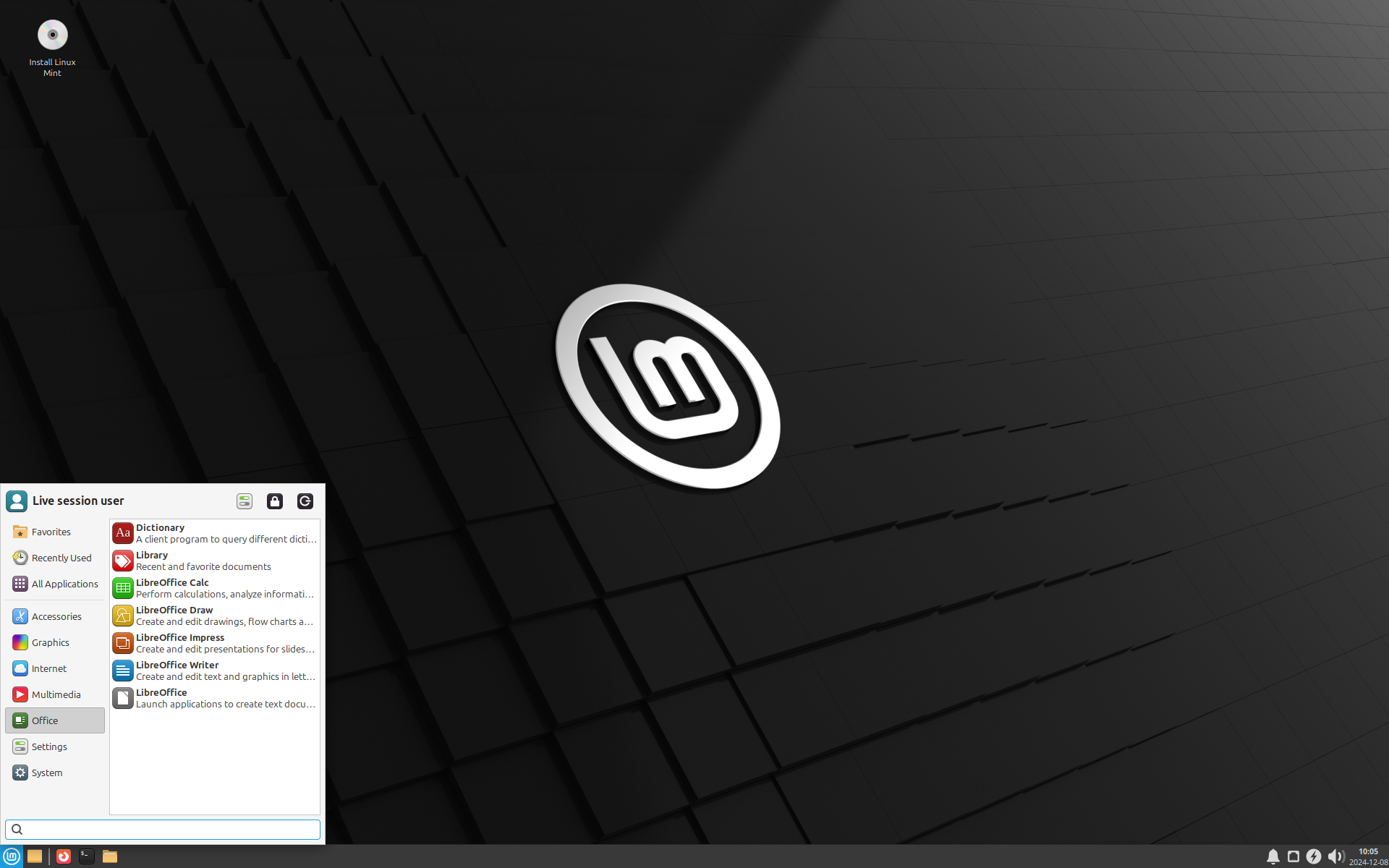
Everyone knows Linux Mint, but the XFCE edition deserves special mention for older PCs. It’s like the comfortable pair of shoes you never want to take off — classic, smooth, and dependable.
The XFCE version trades heavy graphics for performance, but it still keeps Mint’s signature polish. The menu, icons, and wallpapers make it feel like a refined OS built for productivity.
Mint’s designers know how to make a system feel premium. The green-gray theme, subtle animations, and clean layout give it a professional yet lightweight vibe. It’s more resource-efficient than Cinnamon or MATE editions, so it’ll run comfortably on older hardware without lagging.
Final Thoughts
A lot of lightweight Linux distros focus on performance (which is literally the most important part) and completely ignore beauty (sadly). But the distros mentioned above strike a rare balance — they’re light, stable, and genuinely attractive.
So if you’re like me, running an older computer that still deserves to look modern, these are your best bets. Forget gray interfaces from the past — your old machine can still look like it came from the future.
Want to checkout more lightweight linux distro? Here’s a reference link from wikipedia:


